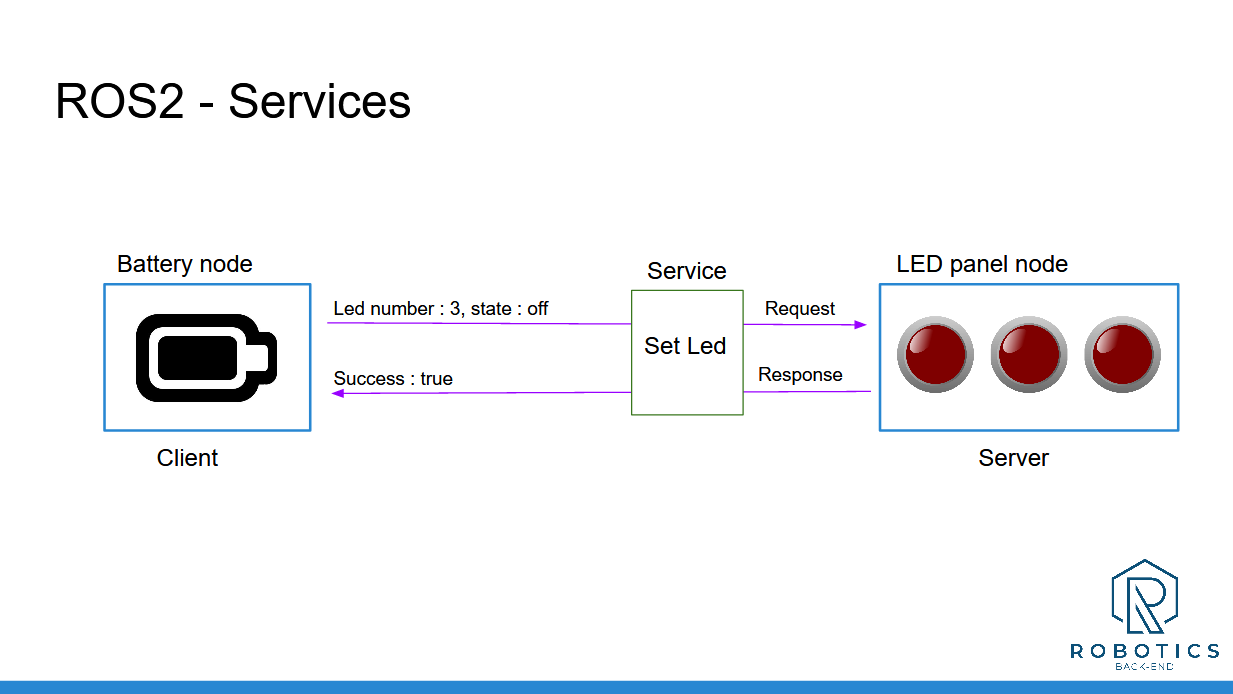
In this section you have discovered ROS2 Services, and seen how you can use them to add client/server communications between your nodes.
To recap, Services are:
Used for client/server types of communication.
Synchronous or asynchronous (though it’s recommended to use them asynchronously, even if you decide to wait after in the thread).
Anonymous: a client does not know which node is behind the service, it just calls the service. And the server does not know which nodes are clients, it just receives requests and responds to them.
To implement Services inside your nodes:
Create a node or start from an existing one. Add as many Service servers as you want (all with different names)
When you call a Service server from a Service client, make sure that the Service name, as well as the Service type (request + response) are identical.
You can only create one server for a Service, but you can create many clients.
When you want to add a new communication between your nodes, ask yourself this question: “Am I just sending some data, or do I expect a response after I send the message?”. This will tell you if you need to use a Topic or a Service. And, as you progress with ROS2, it will eventually become quite obvious for you.
So, now you can create nodes and make them communicate between each other. But, you’ve only used existing messages so far. What if you need to use other message types for your Topics and Services?
Well, in this case, you’ll need to build your own message types, and that’s what we’ll see in the next section.
__________________________________
Download the complete code for this section (this is the code from all previous sections + the current one).