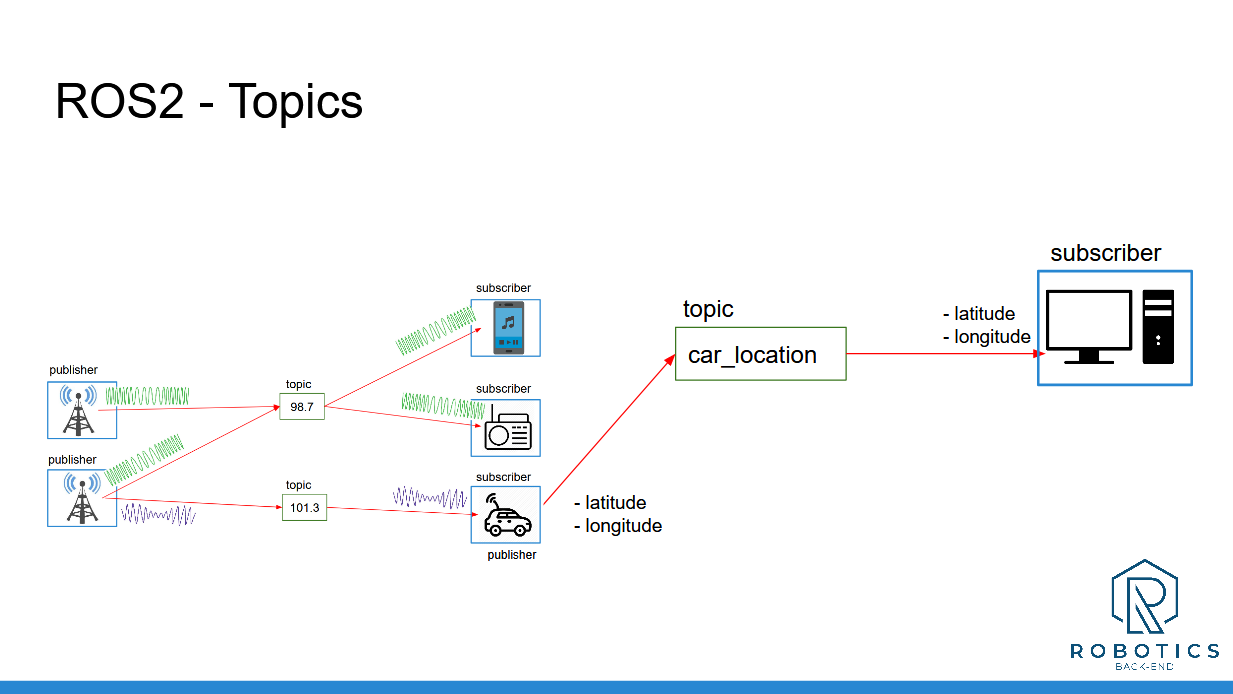
In this section you have seen how to use ROS 2 Topics to communicate between your nodes.
Now, you can already create more complex applications!
To recap, a topic is:
A named bus over which nodes exchange messages
Used for unidirectional data streams
Anonymous: publishers don’t know who is subscribing, and subscribers don’t know who is publishing.
To implement topics in your ROS 2 application:
First create a node (or start from an existing one), then inside your node you can create any number of publishers/subscribers.
A publisher and subscriber must publish/subscribe to the same topic name, and use the same data type. Those are the 2 conditions for successful topic communication.
Then, once you’ve added some publishers/subscribers in your nodes, just launch your nodes, and the communication starts! You can debug them using the “ros2” command line tool, as well as rqt.
Note: your topic names should start with a letter (“98.7” is not a valid topic name, it was just used to introduce the concept with a real life analogy).
By using nodes, you can easily separate your code into different independent modules, one for each part of your application. And with topics, you can make them communicate.
And now, after Topics, the next logical step is to look at ROS 2 Services. That’s what we’ll see in the next section.
___________________________________
Download the complete code for this section (this is the code from all previous sections + the current one).