It’s time for a new activity on ROS 2 topics.
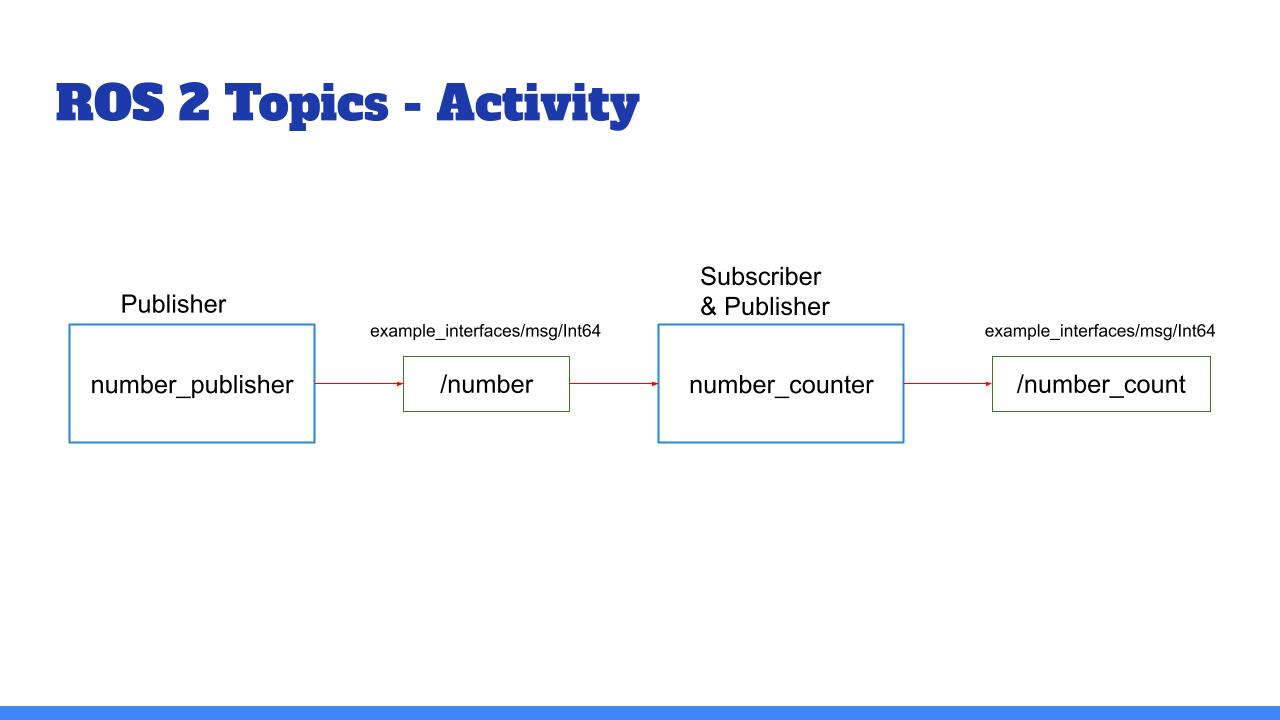
Here is a representation of the graph you should get at the end.
The blue boxes are nodes and the green boxes are topics.
And here’s the final result you should get in the terminal (of course the numbers may be different):
__________________________________________
ros2 topic echo /number_count
data: 38
---
data: 40
---
data: 42
---
__________________________________________
You’ll create 2 nodes from scratch. In the first one you’ll have 1 publisher, and in the second one, 1 publisher & 1 subscriber.
The number_publisher node publishes a number (always the same) on the “/number” topic, with the existing type example_interfaces/msg/Int64.
The number_counter node subscribes to the “/number” topic. It keeps a counter variable. Every time a new number is received, it’s added to the counter. The node also has a publisher on the “/number_count” topic. When the counter is updated, the publisher directly publishes the new value on the topic.
A few hints:
Check what to put into the example_interfaces/msg/Int64 with the “ros2 interface show” command line tool.
It may be easier to do the activity in this order: first create the number_publisher node, check that the publisher is working with “ros2 topic”. Then create the number_counter, focus on the subscriber. And finally create the last publisher.
In the number_counter node, the publisher will publish messages directly from the subscriber callback.
And now, let’s get to work! :)
Make sure you really spend some time on this activity, even if you can’t finish it. That’s the only way you will truly progress.
You can do this activity in both Python and Cpp. In fact, you could write the first node in Python, and the second in Cpp, and vice versa!
I’ll see you in the next lecture for the solution.