
There are so many terms and so much lingo in the world of programming! I realize it can be daunting, especially when first starting out.
Which is why I always like taking a step back ... going back to the basics.
Everything a webpage needs -- text, graphics, styles, scripts … everything -- must be downloaded from a server via an HTTP request. It’s no surprise that the vast majority of time is spent in downloading all of these components, not in actually displaying them.
But HTTP does not work in isolation.
HTTP also relies on the Transmission Control Protocol (TCP) of the internet to work. TCP is used to transfer data requested by a user from a server. With the help of TCP, the user can access any type of data - whether it is images, text, audio, or video – over the internet.
FYI: a lot of different protocols are used whenever you browse the web. The most common is HTTP but there are others like TCP, QUIC, etc.
Data in computers is stored and transmitted as a series of ones and zeros (also known as binary).
To store an image on a computer, the image is broken down into tiny ‘things’ or elements called pixels. A pixel (short for picture element) represents one color. For example, a picture with a resolution of 1024 by 798 pixels has 1024 x 798 pixels = 817,152 pixels.
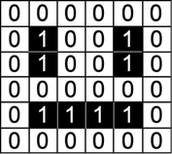
In order for the computer to store the image, each pixel needs to be converted to a binary value. In a monochrome (two colour) image, like the example below, just 1 bit is needed to represent each pixel e.g. 0 for white and 1 for black.
So, let me ask you. How will this simple black and white image be stored?
It will be stored as row of binary numbers. Each row is encoded from left to right, top to bottom. The image here would receive the following binary values:
Ok Clyde, this makes sense. But what about color images? Well, color images are composed of clusters of color pixels. This means it is more complicated than the simple black and white image above.
Bottom line: we will need more bits to "hold" all the color combinations available in each pixel. So, the number of bits determines the range of colours. This is known as an image's colour depth.
For example, let's say an image only has 4 colors (black, dark grey, light grey and white). This means 2 bits will be needed to represent each pixel. Do you understand why? Well, we need to get to 4 different combinations, and the only way we can do this is if we have 2 bits, like this:
00 - black
01 - dark grey
10 - light grey
11 - white
But in reality images contain varying amounts of red, green, and blue (for example, ranging from zero to 255).
One color channel––red, green, or blue––is represented by 8 bits or one byte. The maximum number that 8 bits can represent is 255 and the minimum is zero––which is where the 255 max comes from. Each color for every pixel is represented by 8 bits––for example dark green is represented as 01010010 (red), 10011010 (green), and 01100110 (blue).
But we can even go further than this, can't we?
Each extra bit doubles the range of colors that are available:
one bit per pixel (0 or 1) - two possible colors
two bits per pixel (00 to 11) - four possible colors
three bits per pixel (000 to 111) - eight possible colors
four bits per pixel (0000 to 1111) - 16 possible colors
eight bits per pixel (00000 to 11111) - 255 possible colors
sixteen bits per pixel (0000 0000 0000 0000 to 1111 1111 1111 1111) - over 65,000 possible colors!
The more colors an image requires, the more bits per pixel are needed.
Therefore, the more the colour depth, the larger the image file will be.
Bottom line: images (just like everything else such as .js files, .html files, etc.) are stored and sent over the internet in binary.
See you in the next lecture :)